

Storefront performance has become one of the key success factors in modern eCommerce. Customers expect fast-loading pages, smooth interactions, and instant feedback, especially on mobile. When a storefront feels slow, users rarely wait. They leave, often without a second chance.
This is particularly relevant for Shopware 6 storefronts. Many projects start with solid performance, pass initial tests, and go live without visible issues. But over time, as the store grows, performance often degrades. New plugins are added, custom storefront logic expands, product catalogs grow, marketing tools multiply, and the storefront gradually becomes heavier than it should be.
With recent releases, especially Shopware 6.6 and Shopware 6.7, the platform has taken clear steps to address these challenges. Instead of small optimizations, these versions focus on structural performance improvements that directly impact storefront speed, stability, and scalability under real-world traffic.
This article explores how Shopware 6.6 performance and Shopware 6.7 performance improvements work in practice, why they matter for real-world eCommerce operations, and how merchants can leverage these enhancements to build faster, more scalable storefronts that maintain their speed as businesses grow.
Why Storefront Performance Matters in Modern eCommerce
Storefront performance is no longer just a technical metric. It directly affects:
- conversion rates
- bounce rates
- SEO visibility
- user trust and brand perception
Since 2021, Google has made Shopware SEO performance inseparable from technical performance through Core Web Vitals. These metrics – Largest Contentful Paint (LCP), Interaction to Next Paint (INP), and Cumulative Layout Shift (CLS) – directly influence search rankings. A slow storefront doesn’t just frustrate users; it actively reduces your visibility in search results, cutting off the primary traffic source for most eCommerce businesses.
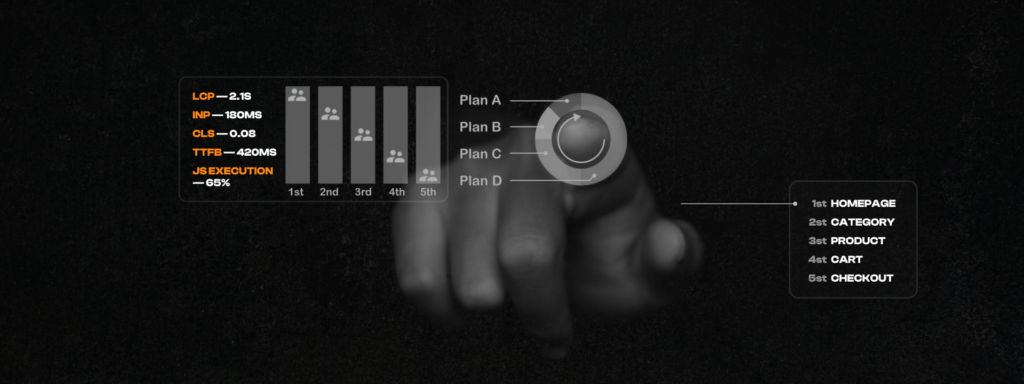
LCP measures how quickly the main content becomes visible (target: under 2.5 seconds). INP evaluates how fast the page responds to user interactions like clicks and taps (target: under 200ms). CLS tracks visual stability, ensuring elements don’t shift unexpectedly as the page loads (target: less than 0.1). Poor performance in any of these areas signals to Google that your site provides a subpar user experience.
For a long time, many performance problems were caused by the interaction of these layers rather than one obvious bottleneck. Recent Shopware versions aim to simplify these interactions and improve Shopware storefront performance by default, reducing the burden on developers to manually optimize every aspect while providing better tools for those who need deeper control.
Why Shopware Storefront Performance Degrades Over Time
One of the most common misconceptions is that storefront performance issues appear because something is “wrong.” In reality, most Shopware performance issues over time are the natural result of growth. Understanding these patterns is the first step toward how to improve Shopware storefront performance systematically. Typical causes include:
Plugin accumulation
Each plugin may be performant on its own, but together they often increase JavaScript execution time, DOM complexity, and asset size.
Custom storefront logic
Business-specific features, dynamic pricing, rules, and personalized content add processing overhead.
JavaScript-heavy storefronts
Historically, many Shopware storefronts loaded JavaScript bundles globally, even when functionality was not needed on a specific page.
Aggressive cache invalidation
Frequent cache resets reduce cache hit rates and increase backend load.
Growing catalogs and dynamic data
More products, filters, and marketing rules increase payload size and rendering complexity.

This is why merchants often ask: “Why does my Shopware storefront feel slow when it used to be fast?”
How Shopware 6 Storefront Performance Is Really Built
Shopware storefront performance is never controlled by one setting. It is shaped by several layers working together:
- Frontend and Asset Loading: JavaScript and CSS have a major impact on perceived speed. Large bundles, render-blocking scripts, and unnecessary initialization slow down first paint and interaction readiness.
- Rendered Data Per Request: The more dynamic data is rendered on each request, the heavier the response becomes. This directly affects Shopware frontend performance, especially on category and product pages.
- Caching and Cache Invalidation: Effective caching is critical. Poor Shopware cache handling or overly aggressive cache invalidation can negate even well-optimized code.
- Scalability and Concurrent Requests: Performance under load matters more than lab benchmarks. The ability to handle Shopware concurrent requests efficiently defines how the store behaves during campaigns and peak traffic.
For a long time, performance problems in Shopware were caused not by individual layers, but by how they interacted. Recent versions aim to simplify this interaction and improve performance by default.
Shopware 6.6 Performance Improvements: JavaScript Optimization Explained
One of the most noticeable Shopware 6.6 performance changes is how storefront JavaScript is delivered and executed.
In earlier versions, many scripts were bundled together and loaded on every page – even when the related functionality was not used. This increased bundle size, delayed rendering, and blocked interaction.

With Shopware 6.6, storefront JavaScript optimization became more selective. Plugins and scripts are now initialized only when the required DOM elements are present on the page.
This directly helps to reduce JavaScript in Shopware storefronts and leads to:
- faster initial page load
- less blocking JavaScript execution
- quicker interaction readiness on listings and product pages
For shops with multiple plugins or custom frontend logic, this change alone can significantly improve Shopware 6 speed, especially on mobile devices where JavaScript execution is often the main bottleneck.
Shopware 6.7 Performance Features: Scalability and Cache Handling
While Shopware 6.6 focused primarily on frontend asset loading, Shopware 6.7 performance improvements go beyond JavaScript optimization and address broader system behavior.

Modern Frontend Tooling
Shopware 6.7 continues the shift toward modern frontend tooling and cleaner Shopware asset loading. Smaller bundles and more efficient builds reduce payload size and improve key performance metrics such as LCP and CLS.
These improvements become especially visible when measuring performance in real production environments rather than local development setups.
Better Stability Under High Traffic
Performance is not only about fast pages – it is also about stability under load. Shopware 6.7 introduces optimizations that allow the platform to handle more concurrent requests with lower latency. This is critical during:
- marketing campaigns
- seasonal sales
- flash promotions
- Black Friday or Cyber Monday traffic
Better Shopware scalability means fewer slowdowns, fewer timeouts, and more predictable behavior when traffic spikes – exactly when performance matters most for revenue.
Smarter Cache Handling and Invalidation
Caching has always been a core part of Shopware, but recent versions significantly refined Shopware’s caching performance. By reducing unnecessary cache invalidations, storefront pages remain cacheable longer without serving outdated content. This leads to:
- higher cache hit rates
- fewer backend requests
- more consistent response times
These changes are often invisible to users but play a crucial role in keeping Shopware storefront performance stable as the project grows.
What Faster Shopware Storefront Performance Means for Merchants
From a business perspective, the impact of a faster and more stable storefront is clear:
- faster loading pages, especially on mobile
- smoother navigation and interactions
- better performance during traffic peaks
- improved SEO-relevant metrics
- higher conversion potential
For development teams, better defaults reduce the need for heavy manual optimizations and make it easier to follow Shopware performance best practices from the start.
When Shopware Improvements Are Not Enough
Even with the improvements in Shopware 6.6 and 6.7, performance is not automatic.
Custom plugins, legacy storefront code, and complex business logic can still introduce bottlenecks. This is where a structured Shopware performance audit becomes essential. A proper audit helps to:
- identify JavaScript and asset bottlenecks
- review cache handling and invalidation logic
- evaluate storefront behavior under load
- define a clear roadmap for Shopware storefront optimization
For growing projects, targeted Shopware optimization services often deliver far better results than generic tuning or infrastructure upgrades alone.

Conclusion: Improve Shopware Storefront Performance Today
The recent performance improvements in Shopware 6 are more than technical refinements. They reflect a clear shift toward modern storefront architecture, realistic traffic scenarios, and better performance out of the box.
For merchants, these improvements translate directly into business outcomes: higher conversion rates as pages load faster, reduced bounce rates as users encounter fewer frustrations, improved SEO visibility as Core Web Vitals scores increase, and more reliable performance during traffic spikes when revenue opportunities are greatest.
For users, the benefits manifest as smoother, more enjoyable shopping experiences. Pages load quickly, interactions feel responsive, mobile browsing works seamlessly, and checkout flows complete without delays. That frictionless experience is what drives customer loyalty and long-term business success.
If you’re running Shopware 6, upgrading to the latest versions (6.6 or 6.7) should be a priority not just for new features, but for the foundational performance improvements they deliver. In the end, that is what Shopware storefront performance optimization is really about.

