


Magento POS for trade shows is a point-of-sale solution that lets businesses sell and manage their Magento website, brick-and-mortar stores, and temporary pop-up shops or trade show booths from a single platform. It synchronizes data from various sales channels in real time, hence maintaining consistency in inventory and order management.
The right Magento POS helps retailers handle on-site selling smoothly and professionally during busy events when unstable Wi-Fi, manual data syncing, and long checkout lines create chaos.
This article explores how to choose the best Magento POS for trade shows, compares 3 leading solutions, highlights key features of each, and shares expert tips.
What are the must-have features of a Magento POS for tradeshows
Below are vital features any Magento POS for Trade Shows should have to make the process smooth and professional.
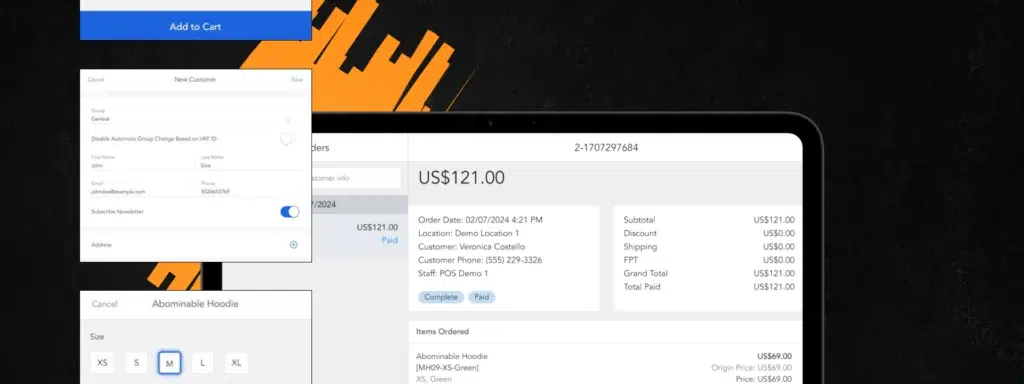
Key requirements
A great Magento POS for trade shows should be designed to support every step of the on-site selling journey. Here are the key features to ensure a smooth, professional experience:
- Portability and fast setup: The POS should work well on tablets, laptops, or iPads in order to let your staff be up and operating efficiently within minimal booth space.
- Offline mode: Don’t let unstable or completely missing Wi-Fi stop you from selling. All data will automatically be synced upon re-establishing the connection.
- Real-time inventory synchronization: Maintain proper stock quantities through your Magento website, brick-and-mortar stores, and event venues to prevent overselling or discrepancies in stock.
- Flexible payment options: Allow multiple payment methods, like cards, mobile wallets, and cash, to facilitate timely, smooth transactions.
- Fast checkout: Barcode scanners, speedy payment workflows, and intuitive interfaces will help reduce client waiting times and accelerate order processing.
- Multi-location tracking: Set up a specific “Trade Show” location in Magento to track the event-only inventory and sales performance.
- Customer data capture and loyalty integration: Capture customer details at checkout to support follow-up campaigns, loyalty programs, or remarketing post-event.
- Real-time reporting and analytics: This enables the tracking of sales, bestselling items, and revenue in real time to inform decisions and adjust strategies during the event.
- Security and compliance: Safeguard sensitive customer and payment information using the Magento 2 encryption key, role-based access, and full compliance with PCI and GDPR standards.
- Ease of use: Select a system that is intuitive enough for new staff to quickly learn before each event, without significant setup time or operational errors.
Why Magento-native POS matters?
Native Magento POS integration means directly integrating your Magento backend — no third-party connector, no syncing delays, and no data duplication. All this, so you can:
- Store all customer and product information in a single unified Magento dashboard.
- Have real-time access to inventory and order updates right after every sale.
- Automatically consolidate trade show and online sales data into unified reports.
Using a non-native Magento POS may result in mismatched data, manual syncing, or failed integration, expensive problems in the middle of a busy event. Therefore, staying within the Magento ecosystem ensures consistency, accuracy, and complete control of your selling process.
Comparison of Magento POS solutions for tradeshows
Below are three popular Magento POS vendors — Magestores, Webkul, and Ebizmarts — along with their features, pricing, and pros & cons to consider for your next trade show presence.

1. Magestore
Since 2009, Magestore has been developing an all-in-one Magento 2 Point of Sale software, which is natively built for Magento and thus ready for immediate use without third-party connectors. Currently, the solution powers 15,000+ retail businesses worldwide.
Key Features:
- Magento-native integration: Real-time catalog, inventory, customer, and order synchronization.
- Cross-platform POS: Works on iPads, tablets, laptops, PCs, and Macs.
- POS offline mode with auto-sync
- A variety of payment options: Cash, credit and debit cards, split/partial payment, contactless, etc.
- Integrated gateways: Compatible with Square, Authorize.net, and many other leading payment processors.
- Multi-terminal scalability: Control multiple booths or counters from a single system.
- Inventory management: Track stock across warehouses and event locations.
- Custom and wholesale pricing: Apply client-specific and event-only discounts.
- Self-checkout: Enable kiosk or QR-based checkout for faster service.
- Staff control: Manage roles, permissions, and audit trails.
- ERP integration: Integrate with systems such as NetSuite or QuickBooks.
- Omnichannel reporting: See performance across all channels in one dashboard.
Trade Show Features: Magestore POS for pop-up shops is optimized for fast, reliable event sales, even on unstable Wi-Fi. It supports offline checkouts, quick payments, and real-time syncing, allowing retailers to manage booth-level sales while maintaining full Magento control.
Must-Have Features
- Portability & Fast Setup — Cross-platform POS on iPad, tablet, laptop, PC, Mac (Supported)
- Offline Mode — Full offline mode with auto-sync (Supported)
- Real-Time Inventory Sync — Native Magento sync, real-time (Supported)
- Flexible Payment Options — Cash, card, NFC, split payments, integrated gateways (Supported)
- Fast Checkout — Barcode, quick payment, self-checkout (Supported)
- Multi-Location Tracking — Supports “Trade Show” location via MSI (Supported)
- Customer Data & Loyalty — Loyalty features and customer data capture (Supported)
- Real-Time Reporting — Omnichannel reporting dashboard (Supported)
- Security & Compliance — PCI & GDPR compliant, role-based access (Supported)
- Ease of Use — Intuitive, event-ready UI (Supported)
Pros:
- Native Magento, no connector required.
- Highly customizable, scalable for multi-location selling.
- Strong offline performance and data security.
- Compatible with most hardware and payment processors.
Cons:
- Because Magestore POS operates natively within Magento, installation and configuration require a solid technical understanding of the platform.
Pricing:
- POS Lite: $69/month (subscription-based).
- POS Commerce & POS Customization: One-time payment, customized pricing.
Customer Reviews:
- Real-time sync between online and event stores works flawlessly.
- Offline mode is reliable, perfect for trade shows.
- Easy setup, great customization options, and strong reporting.
2. Webkul
Webkul offers affordable Magento POS extensions with 10+ years of expertise, making them a good choice for merchants managing multi-outlet inventory.
Key Features:
- Offline mode with auto-sync
- Real-time data synchronization
- Cashier and session tracking
- Discount and coupon management
- Inventory by pickup location
- Barcode management add-on
Trade Show Features: Building in local data caching for offline sales, auto-sync when reconnected, apps already, or PWA.
Must-Have Feature
- Portability & Fast Setup — Browser-based POS and PWA (Supported)
- Offline Mode — Offline with local data caching (Supported)
- Real-Time Inventory Sync — Auto-sync when reconnected (Limited)
- Flexible Payment Options — Limited built-in integrations (Limited)
- Fast Checkout — Barcode scanning supported via add-on (Supported)
- Multi-Location Tracking — Limited pickup location tracking (Limited)
- Customer Data & Loyalty — Limited; manual data entry (Limited)
- Real-Time Reporting — Basic sales reporting only (Limited)
- Security & Compliance — Dependent on setup (Limited)
- Ease of Use — Simple interface (Supported)
Pros:
- Affordable pricing for small and mid-sized merchants.
- Easy to install and operate.
- Supports both PWA and native mobile app POS.
Cons:
- Occasional syncing lag for large or complex inventories.
- Limited UI customization in comparison with higher-end POS systems.
Pricing:
- PWA POS: $199 – $897 (one-time payment, depending on Magento edition).
- App POS (Android/iOS): $499 – $2,545 (one-time payment, depending on Magento edition).
Customer Reviews:
- Offline-to-online order syncing is fast and always works.
- Good value for price — straightforward setup.
- Some minor delays in the real-time inventory display during high traffic.
3. Ebizmarts
Ebizmarts offers an intuitive POS solution, built for iPad, and trusted by large retail chains and enterprise-level Magento stores.
Key Features:
- Customizable iPad POS interface
- Real-time customer and order updates
- Gift cards, discounts, and returns management
- Barcode scanning and receipt printing/email
- Online/offline sales synchronization and multi-tax support
Trade Show Features: Offline capability for products, real-time sync to inventory, and an iPad app for selling on-site.
Must-Have Feature
- Portability & Fast Setup — iPad-only (Limited)
- Offline Mode — Offline order processing supported (Supported)
- Real-Time Inventory Sync — Real-time order & inventory updates (Supported)
- Flexible Payment Options — Standard payment methods only (Limited)
- Fast Checkout — Barcode & receipt printing (Supported)
- Multi-Location Tracking — No explicit multi-location support (Limited)
- Customer Data & Loyalty — Customer data sync and gift cards (Supported)
- Real-Time Reporting — Limited in-depth analytics (Limited)
- Security & Compliance — GDPR and PCI supported through Magento (Supported)
- Ease of Use — User-friendly iPad app (Supported)
Pros:
- Easy to use, visually clean interface
- Dependable API integration
Cons:
- iPad only; no Android and desktop versions
- Free support is limited to email only for the lower tiers
Pricing:
- Enterprise Plan ($320/month)
- Enterprise+ Plan (Custom quote).
Customer Reviews:
- Praised for smooth offline performance (“works great without connection”) and seamless data flow.
- Some mixed feedback on the full offline capability for large catalogs.
Magento POS Case Studies for Trade Shows
Real-life examples demonstrate how Magento POS can enhance trade show efficiency by syncing real-time inventory and unifying customer data.
Upper Limits (Magestore POS)

Upper Limits, an Illinois-based retailer of vapes and wellness products, overcame scattered information and inventory issues that had previously been caused by using QuickBooks POS. After implementing Magestore POS, their Magento store, warehouses, and sales at events started synchronizing smoothly every five minutes. This enabled centralized management, accurate inventory management, and customization.
Result: 200 orders per day; $98,000 revenue per month. Smoother operations at the trade shows, no overselling.
Peppermint (Ebizmarts POS)

Peppermint is a premium kids’ wear brand in London that replaced manual order-taking at baby shows with Ebizmarts’ iPad POS. The system sped up transactions, captured customer e-mails via MailChimp, centralized all data in Magento, and increased sales at their first event by 25%, with 55–60% attendee sign-ups.
7 Tips to choose the right Magento POS for trade shows
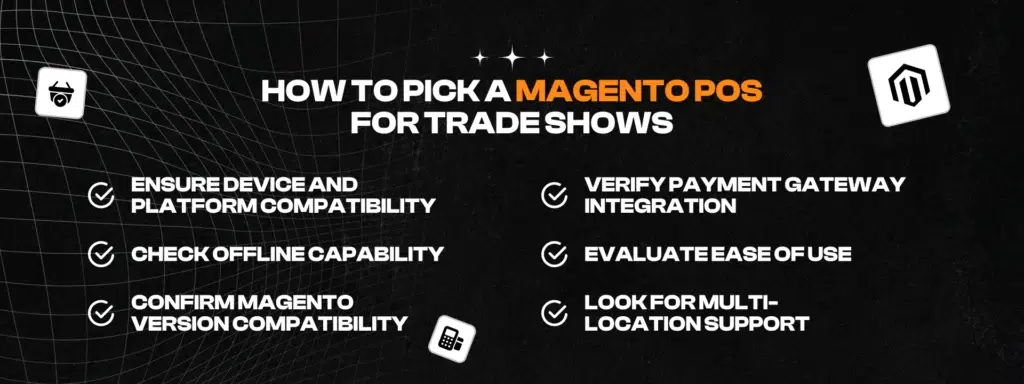
Choosing the right Magento POS ensures smooth operations and faster sales during events. Here are seven essential tips that will help you make a choice:
- Ability to Work Offline: Choose a POS capable of actually going offline and recording orders when there is no internet. As soon as it detects an internet connection again, it automatically syncs, thus never disrupting sales.
- Ensure Device and Platform Compatibility: Verify whether or not the POS system works on a preferred device (tablet, iPad, laptop) and supports scanners, printers, and payment terminals like Stripe or Square.
- Verify Compatibility with Magento Version: Ensure that the POS fully supports your Magento 2/Adobe Commerce version, and that it receives regular updates so that sync issues can be avoided.
- Verify Payment Gateway Integration: Look for built-in integration with gateways, such as PayPal or Authorize.net, so that transactions are correctly and instantly reflected in Magento.
- Assess Ease of Use: The POS should be easy to use, provide easy staff training, and offer a quick and easy barcode scan and navigation.
- Consider Multi-location Capabilities: A POS that integrates with Magento MSI allows you to create a separate “Trade Show” location to accurately track inventory.
- Check Support and Pricing: Review levels of event day support, flexible pricing that accommodates short duration use, and get ready for your event.
How to prepare Magento POS for your next trade shows
After selecting the most suitable POS solution, you need to configure, test, and deploy that POS in practice before, during, and after your trade show. Below is a straightforward, realistic step-by-step checklist to get you ready effectively.
Step 1: Create a new “Trade Show” location in Magento
To get started, create a location within your Magento backend that reflects a “Trade Show.” This will help you:
- Track your inventory more accurately
- Track sales for that specific event
- Avoid overselling from your main warehouse
You can later deactivate or reuse this location for future events.
Step 2: Load and Sync Event Inventory
Only load products that you plan to sell at the event. Upload or assign to the “Trade Show” location and then sync with the POS. Make sure you:
- Confirm product setup (price, SKU, barcode, image)
- Set quantity in stock and low-stock alerts
- Test sync to make sure you have real-time inventory updates
Step 3: Configure Taxes, Discounts, and Payment Settings
Prior to syncing your POS, it is important to review your POS configuration to ensure a smooth checkout experience.
Make sure to:
- Use the correct tax rate for the trade show location
- Set up coupon/discount codes or bundles for event promotions
- Test the payment gateway integration (and ensure it works in offline mode)
This will ensure you are in sync with the pricing and checkout of your Magento store.
Step 4: Test POS Hardware (Scanner, Printer, Terminal)
Before the event, make sure that you test all hardware that you plan to use.
- The barcode scanner: make sure it scans quickly and accurately.
- Receipt printer: check layout and paper quality.
- Card Reader/Terminal: process a small test transaction.
Confirm your POS operates properly while offline and auto-syncs once back online..
Step 5: Train Staff and Simulate Offline Sales
Familiarize your on-site team with the POS. This means you let them:
- Process demo orders, refunds, and payments
- Test mix of online and offline transactions
- Use practice no-sync and internet drop processes
- Review the complete flow of checkout processes
By providing a brief hands-on experience, you will minimize mistakes and enhance the speed at which service can be provided.
Step 6: After the event: reconnect, sync, and analyze data
Once the event is over, reconnect your POS to Magento to sync all sales and inventory data.
Then review:
- Sales figures and top-selling products
- Inventory discrepancies between the POS and Magento
- Customer insights and prospects generated at the event
These insights will help improve tradeshow preparation and inventory planning for your next event.
Conclusion
Having a well-prepared Magento POS for tradeshow or event sales allows retailers to process sales, monitor product inventory levels, and know their customers at any time and place. If you have selected the right POS, with the right and clear preparation, you will convert every tradeshow or pop-up into a great sales experience.
Are you ready to make your event sales easier? Contact IT Delight today to collaborate on a unique Magento POS fulfilment plan tailored to your needs and business style.

